How to Organize AI Project Files
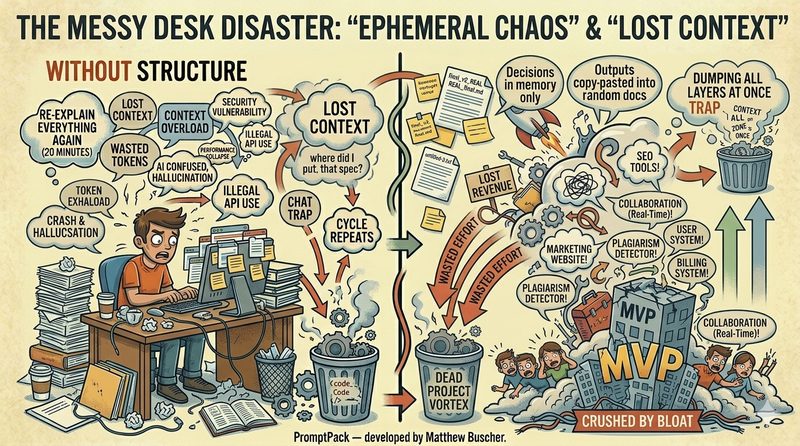
Most people using AI for projects have no file organization at all. Chat transcripts live in browser tabs. Outputs get copy-pasted into random docs. Decisions exist only in memory. When a project spans more than a few sessions, this chaos becomes the number one productivity killer — worse than bad prompts, worse than model limitations.
After 40 years of managing cross-disciplinary engineering teams, I can tell you: the file organization problem with AI is the same problem I've seen with human teams my entire career. When there's no structure, work gets lost, decisions get repeated, and everyone wastes time figuring out where things are instead of building.
Here's the folder structure that fixes it.
The Canonical Folder Structure
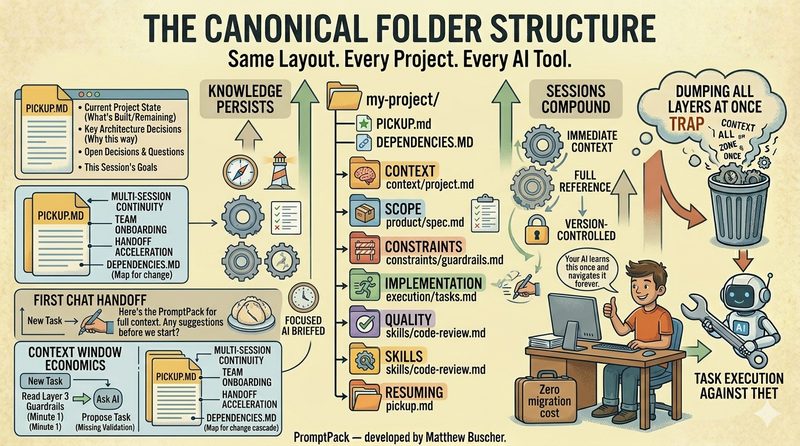
Every AI project — regardless of size, team, or tools — should use the same six folders. This is called canonical structure: a standardized layout that your AI learns once and navigates forever.
This structure works whether you're building a SaaS product, writing a book, developing a course curriculum, or shipping an AI agent. The folder names stay the same. The contents adapt to your project.
What Each Folder Does
context/ — The Project's Memory
This is where your project's specifications and background live. It includes your foundation document (project identity, target audience, constraints, and success criteria), feature specs, design documents, and any research or background material your AI needs to understand the project. When you start a new session and your AI needs to understand what you're building, this is where it looks.
product/ — What You're Shipping
Deliverables go here. Code, content, generated assets — the actual output of your work. Keeping deliverables separate from specifications prevents confusion between "what we planned" and "what we built."
constraints/ — The Guardrails
Tech stack decisions, quality standards, compliance requirements, brand guidelines — anything that constrains what your AI can suggest. When your AI reads this folder, it knows not to suggest Python when you've committed to TypeScript, or to ignore GDPR when you've flagged it as a requirement. Without explicit constraints, your AI will suggest whatever seems reasonable in the moment, which leads to inconsistencies that compound over time.
execution/ — The Work in Progress
Roadmaps, sprint plans, daily progress notes, and raw brainstorms live here. This is the heartbeat of the project — what's being worked on right now, what's next, and what's blocked.
quality/ — Proof That It Works
Test plans, test cases, metrics baselines, and known issues. When you're refactoring or extending your project, this folder tells your AI what tests need to pass and what quality bar to maintain.
skills/ — Knowledge That Compounds
Reusable patterns, solutions, and templates. If you solve authentication once, document the pattern here. Next project, your AI can reference it instead of solving from scratch. Over time, this folder becomes a knowledge base that accelerates every future project.
The Two Files That Hold It All Together
PICKUP.md — Session Continuity
This is the most important file in any AI project. At the end of every work session, you write (or have your AI write) a short summary: what was done, what was decided, what's blocked, what's next. At the start of the next session, your AI reads this file and resumes instantly.
Without PICKUP.md, every session starts cold. You spend 15-20 minutes re-establishing context. With it, you're productive in under 5 minutes. Over the life of a project, this saves hours.
DEPENDENCIES.md — The Knowledge Map
This file tracks what your project depends on — external APIs, internal references, architectural decisions made in earlier phases, prior art from other projects. When your AI reads DEPENDENCIES.md, it knows what's already been decided and what external systems it needs to respect, preventing suggestions that conflict with established foundations.
Why This Works with Any AI Tool
Because everything is plain markdown files in a standard folder structure, this system works with any AI that can read text. ChatGPT, Claude, Gemini, Copilot, Cursor, OpenClaw agents — the methodology is completely platform-agnostic. Your project structure lives on your file system, not locked inside any vendor's product.
If you switch AI tools midway through a project, your entire context, specifications, constraints, and session history come with you. Zero migration cost.
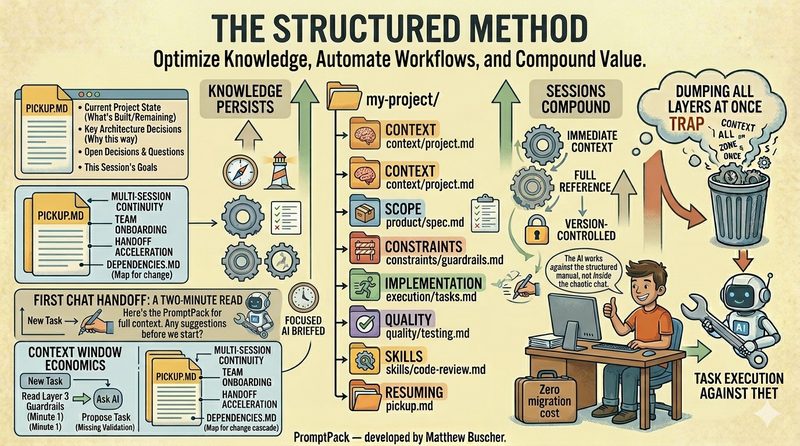
The structure is the system. Your AI doesn't need special plugins or integrations. It just needs organized files and a clear place to look. The same principles that make human teams efficient — clear documentation, consistent organization, structured handoffs — make AI efficient too.
Getting Started in 10 Minutes
You don't need to implement everything at once. Start with three things:
1. Create the folder structure. Make the six folders. Even if most are empty at first, the structure is established.
2. Write a foundation.md. Five minutes. Project name, who it's for, what constraints exist, what "done" looks like. This is Layer 0 — the single document that orients your AI to the project.
3. Start writing PICKUP.md. At the end of your next AI session, spend 3-5 minutes writing what happened and what's next. At the start of the following session, give it to your AI. The difference will be immediate.
Keep Reading
Skip the Setup. Get the Templates.
PromptPack provides pre-built templates for every folder, every layer, and every handoff document — ready to use with any AI platform.
Get PromptPack →